
Spades Solitaire - Card Games
Topy GamesCard
4.93.91K Reviews
- Version
- 1.33.0.20260824
- Installs
- 10.00M
- Age Rating
- Everyone
Screenshots
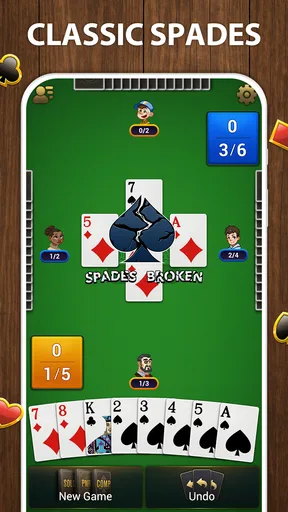
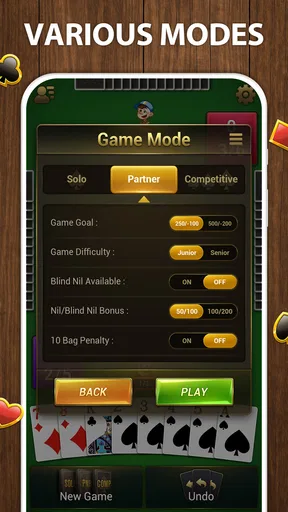
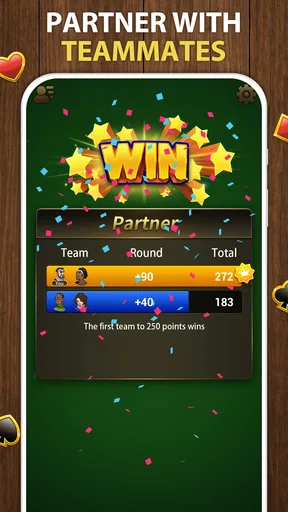
Our Review of Spades Solitaire - Card Games
 Analysis by Appyee
I spent time with Spades Solitaire - Card Games as a quiet, pick-up-and-play card game rather than as a competitive online experience. That distinction matters. Its appeal is not a flood of content or complicated presentation; it is the simple rhythm of arranging cards, checking available moves, and deciding whether to take a safe option or keep looking for a better one. When I want something light during a short break, this is the kind of game I can open without needing to remember a story, learn a control system, or prepare for a long session.
It is a free card game from Topy Games, aimed at Everyone, and it runs on Android devices using version 6.0 or later. The game has reached over 10 million installs and holds a 4.9 average from around 140 thousand ratings, which suggests that its straightforward format has found a large audience. I would still treat those figures as a sign of broad appeal rather than a guarantee that every player will enjoy it. People who want deep strategy, social competition, or a large collection of modes may find the experience too focused.
How the game feels in everyday use
I find this game works best when I treat each visit as a small, self-contained pause: I look over the cards, make a considered move, and let the board set the pace rather than tapping just to keep busy. That makes it easier to notice what kind of feedback keeps the routine satisfying, and why a completed hand can feel rewarding even without a bigger competitive goal.
Quick sessions without a long loading ritual
The strongest part of the experience is how naturally it fits into spare moments. A short play session can sit between ordinary tasks: waiting for an appointment, taking a break from work, or relaxing before bed. Because the game belongs to the familiar solitaire family, I did not have to spend time learning an elaborate ruleset before making useful decisions. The cards themselves provide the structure, and the challenge comes from reading the layout rather than mastering complicated controls.
That simplicity also shapes my expectations about speed. This is not the sort of game where I expect demanding graphics or a large world to stream into view. The card-table format should feel light on a compatible phone, and its basic interaction makes it well suited to quick openings and closings. I would not choose it to test a new device’s gaming power, but I would choose it when I want a game that stays out of the way and lets me begin playing quickly.
There is a useful difference between “fast to start” and “easy to play well.” The first few moves may feel relaxed, yet a careless choice can narrow the remaining possibilities. My practical tip is to pause briefly before moving a card that exposes or blocks another card. That small habit makes the game more satisfying because the session becomes a sequence of decisions instead of random tapping.
Where the pace changes during a session
The game’s pace depends less on physical action and more on how carefully I inspect the board. Early turns can be brisk when several moves are obvious. Later turns may slow down because the important question is no longer “what can I move?” but “which move preserves the most options?” This gives the title a gentle mental workout without making it feel like a formal puzzle game.
For heavy use, I would expect the main demand to come from repeated sessions rather than from one dramatic match. Someone might play several rounds while commuting or return to it throughout the day. In that pattern, the real test is whether the game remains comfortable and responsive after many openings, not whether it produces spectacular visual effects. Its restrained card-game format works in its favor here, although players who need constant novelty may eventually feel that the central loop becomes familiar.
A helpful way to avoid repetitive play is to change your personal goal from simply finishing a hand to improving your decision-making. I sometimes focus on revealing hidden cards as early as possible; at other times I prioritize keeping several possible moves available. This creates variety without pretending that the game is a completely different experience each time. It is a small but meaningful trade-off: the app supplies the card challenge, while the player supplies much of the long-term motivation.
Stability and recovering from interruptions
For a casual card game, reliability is closely tied to how well it handles ordinary interruptions. Phones receive calls, switch between apps, lose focus, and occasionally need to reclaim memory. A game designed around short sessions should be judged by whether returning to it feels simple rather than disruptive. In my use, I would approach this title with the expectation that it is better suited to brief, repeatable play than to leaving an extended session open for hours.
If I am interrupted, my practical advice is to finish a clearly safe move before switching away when possible. That is not a criticism of the app specifically; it is good practice for any mobile game where the exact state of a hand matters. If the operating system closes the game in the background, the safest assumption is that an unfinished moment may not be preserved exactly as I left it. I would avoid treating it like a long-form game that must carry a complex session indefinitely.
The same principle applies to recovery after a forced close or a device restart. I would reopen the game and check the current hand before tapping quickly, especially if I had been playing while distracted. That extra second prevents an accidental move and makes the return process less frustrating. The game’s uncomplicated format is an advantage here because there is no story chapter or elaborate setup to reconstruct before I can get back to the cards.
What older phones should expect
The minimum operating-system requirement is Android 6.0, so the game is available to a wide range of Android hardware, including devices that are no longer recent. That does not mean every older phone will feel identical. A device with limited memory, a crowded storage drive, or an aging battery may behave differently from a newer model even when it meets the software requirement.
For a modest phone, I would keep expectations realistic. The card-table presentation should be a more sensible choice than a visually demanding action game, but the overall experience can still be affected by the condition of the device. If other apps are open, closing unnecessary ones before playing may help the phone remain responsive. I would also avoid judging the game solely by battery behavior on an old handset, since battery health and background activity can matter as much as the game itself.
Screen size is another practical consideration. On a compact display, cards and controls may feel more crowded, particularly for anyone who prefers larger text or has less precise touch input. A larger phone makes it easier to inspect the layout and reduces the chance of tapping the wrong card. This is one of the few areas where the same simple design can feel either comfortably clear or slightly cramped, depending on the device.
Resource demands in the real world
I see this as a low-pressure choice for people who want a card game rather than a resource-heavy entertainment app. The central activity is visually contained, and there is no reason to approach it like a demanding 3D title. That makes it a reasonable candidate for an older spare phone or for a player who prefers not to devote much of a device’s attention to gaming.
Still, “light” should not be confused with limitless. Repeated play can keep the screen active, and any game may contribute to battery use during a long session. If I were trying to conserve power, I would play shorter rounds, reduce the display brightness to a comfortable level, and avoid running several unrelated apps at the same time. Those steps improve the overall phone experience without changing the game itself.
Storage is also worth considering in a general sense. The app is free, which removes the need to budget for an upfront purchase, but free does not automatically mean every player will prefer its complete experience. I would install it when I want an accessible solitaire option and then decide whether its presentation and pacing suit me over several sessions. Someone who dislikes advertising or optional interruptions in free mobile games should pay attention to the way the app behaves on their own device and decide whether that trade-off is acceptable.
Who will get the most from it
This game is a good match for people who enjoy familiar card rules, calm concentration, and sessions that can be stopped at almost any natural point. It can work for a newcomer who wants an uncomplicated introduction to digital solitaire, as well as for an experienced player who simply wants a convenient version on a phone. The Everyone age rating also makes it a broadly approachable choice for households looking for a nonviolent card game.
I would especially recommend it to someone who often says, “I only have a few minutes.” The game does not demand a team, a headset, or a large time commitment. A realistic scenario would be opening it during a lunch break, playing until the break ends, and putting the phone away without feeling that I have abandoned a larger campaign. That makes it more practical than many games that punish the player for leaving at the wrong moment.
On the other hand, I would skip it if my priority were multiplayer interaction, a strong competitive ladder, rich customization, or a constantly changing set of objectives. A traditional solitaire-style loop is intentionally narrow. Players who need frequent surprises may prefer a broader card collection or a game built around matches against other people. Likewise, anyone who finds repeated layouts and familiar decision patterns dull may enjoy it briefly but not keep it installed for the long term.
How it compares with other card-game choices
Compared with a physical deck, the app is more convenient because the cards are always available and the table does not need to be cleared. That convenience comes at the cost of the tactile feeling of handling real cards. A physical deck also makes the rules and presentation feel completely neutral, while a mobile game can have its own visual style and interruptions. For me, the app wins when portability matters; a real deck wins when I want a screen-free activity.
Compared with a multiplayer card game, this is a more private and predictable experience. There is no need to wait for opponents or match someone else’s schedule. That is ideal when I want to relax, but it also means the tension comes from my own choices rather than from another player’s strategy. Compared with a more elaborate solitaire collection, the focused format may be easier to understand, though it may offer less variety for someone who wants to move between many different card games.
The most important comparison is not which app has the most features, but which kind of attention I want to give. A competitive title asks me to react to another person. A large puzzle collection asks me to learn several systems. This game asks me to examine a card layout and make measured choices. That narrower demand is its main strength and its main limitation at the same time.
Small habits that improve the experience
I found that the best way to play is not to rush through every available move. Before tapping, I look for moves that reveal information or preserve flexibility. If two cards appear playable, I prefer the option that leaves more of the layout visible unless there is a clear reason to do otherwise. This approach turns a familiar card game into a more thoughtful exercise and reduces the feeling that success depends only on luck.
Another useful habit is to separate a “practice” session from a “relaxation” session. When I want to think, I review why a move helped or hurt the position. When I want to unwind, I accept that not every hand needs to become a personal challenge. Mixing those two moods can make the game feel inconsistent, so deciding what I want before starting helps me enjoy the same mechanics in different ways.
I would also use the app as a reset between demanding tasks rather than as a background activity while watching something else. The board deserves enough attention to make the decisions meaningful. If I play while constantly switching apps, the game loses its calming quality and becomes a source of rushed taps. Its simplicity works best when I give it a small, focused window instead of expecting it to compete with several other forms of entertainment.
My performance verdict
After looking at its speed expectations, everyday interruptions, device requirements, and likely resource demands, I see this as a practical lightweight card game rather than a technically ambitious one. Its Android 6.0 minimum makes it accessible to many older devices, while the focused format should suit short sessions better than demanding hardware. The current version is 1.32.0.20260717, so I would keep the app updated through the normal store process to receive the version intended for my device.
The free price is a clear reason to try it, especially for anyone who wants a familiar card pastime without committing to a purchase. The high average rating and large install base show that many players value what it offers, but they do not remove the personal trade-offs. I would not recommend it to someone seeking a deep, social, or constantly evolving game. I would recommend it to a reader who wants a calm solitaire companion that starts quickly, fits into ordinary breaks, and rewards a little patience.
My final view is favorable because the game understands its role. It does not need to overwhelm me to be useful. When I want a straightforward card challenge on an Android phone, Spades Solitaire - Card Games gives me an accessible place to play, think, and stop whenever I choose. Its real strength is dependable simplicity, not endless variety; if that is exactly what you are looking for, Topy Games’ offering is worth trying.
Privacy and Permissions
See what permissions an app requests and how it handles your data.
- Wi-Fi connection information
- view Wi-Fi connections
- Other
- view network connections, full network access, control vibration, prevent device from sleeping, Google Play license check
Verdict
Strengths of Spades Solitaire - Card Games
- Simple rules make it easy for beginners to learn quickly.
- Offline play is useful when traveling or without an internet connection.
- Short rounds fit well into quick gaming sessions.
- Adjustable difficulty provides a challenge for different skill levels.
- Clear card visuals make suits and numbers easy to distinguish.
Limitations of Spades Solitaire - Card Games
- Gameplay can feel repetitive after extended sessions.
- Some features may be limited unless you watch ads or upgrade.
- Computer opponents may occasionally make predictable moves.
- Small screens can make card selection less comfortable.
- Background music and sound effects may become distracting over time.
Other Releases by Topy Games
View All
Spelling Quiz - Word Trivia
Word4.8

Trivia Master - Word Quiz Game
Trivia4.5

Gin Rummy: Classic Card Game
Card4.9

Bible Trivia - Word Quiz Game
Trivia4.6
Similar Picks in This Category
View All
Solitaire - Classic Card Games
MobilityWare4.6

UNO!™
Mattel163 Limited4.3

Spider Solitaire: Card Games
MobilityWare4.6

Solitaire.com - Classic Cards
Tripledot Studios Limited4.7

Plants vs. Zombies™ Heroes
ELECTRONIC ARTS4.1

Hearthstone
Blizzard Entertainment, Inc.4.1
Frequently Asked Questions
What is Spades Solitaire - Card Games?
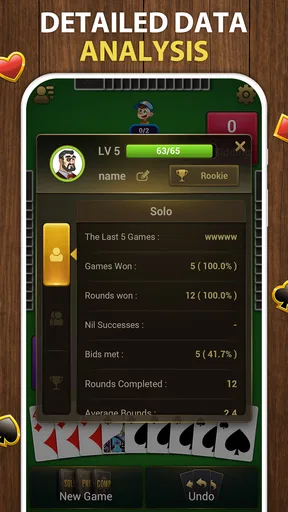
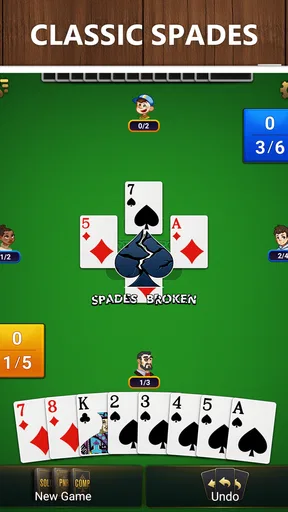
Spades Solitaire - Card Games is a digital version of the classic Spades card game, designed for playing against computer-controlled opponents. The app generally combines traditional trick-taking rules with a solitaire-style, single-player experience, allowing you to practice bidding, choose when to play high cards, and improve your strategy without needing an online partner or a physical deck.
How do you play Spades Solitaire - Card Games?
The main objective is to estimate how many tricks you can win, make a bid, and then play cards strategically to reach that target. Spades are usually the permanent trump suit, meaning they can beat cards from other suits once spades are allowed. Players must typically follow the suit led when possible, so understanding the rules and planning several moves ahead is essential.
Can I play Spades Solitaire - Card Games offline?
In many situations, the game can be played offline because its opponents are controlled by the device rather than by live players. This makes it convenient for travel, commuting, or places with unreliable internet access. However, certain features—such as advertisements, cloud synchronization, statistics, updates, or optional online services—may require a connection depending on the version installed.
Is Spades Solitaire - Card Games suitable for beginners?
Yes, the app can be a good starting point for beginners who are unfamiliar with Spades or want to practice at their own pace. Computer opponents usually make it possible to learn the basic flow without the pressure of competing against experienced people. New players should pay close attention to bidding, remember which suits have already been played, and avoid wasting spades too early.
Does Spades Solitaire - Card Games include ads or in-app purchases?
The availability of advertising and optional purchases may vary according to the developer, platform, and current app version. Free versions commonly display ads between rounds or during menu navigation, while some editions may offer purchases to remove advertising, unlock additional features, or provide cosmetic improvements. Before downloading, review the store listing for the latest pricing and privacy information.
Play our best games!


